
In the timeline of a security incident or a complex investigation, the “Capture” phase is often a luxury. Frequently, the operator is called in after the event has occurred. The post has been deleted, the server is down, and the target has vanished.
In these scenarios, we move from “Active Collection” to Web Forensics.
Web forensics is the art and science of reconstructing digital activity from the “scars” it leaves behind. It is the realization that the web is not a series of isolated events, but a continuous stream of state changes. If you know where to look, you can rebuild the past.
This essay explores the techniques and tools required to perform high-fidelity web forensics, the same operating logic that drives WebForensicsLab and the broader evidence and forensics lane on this site.
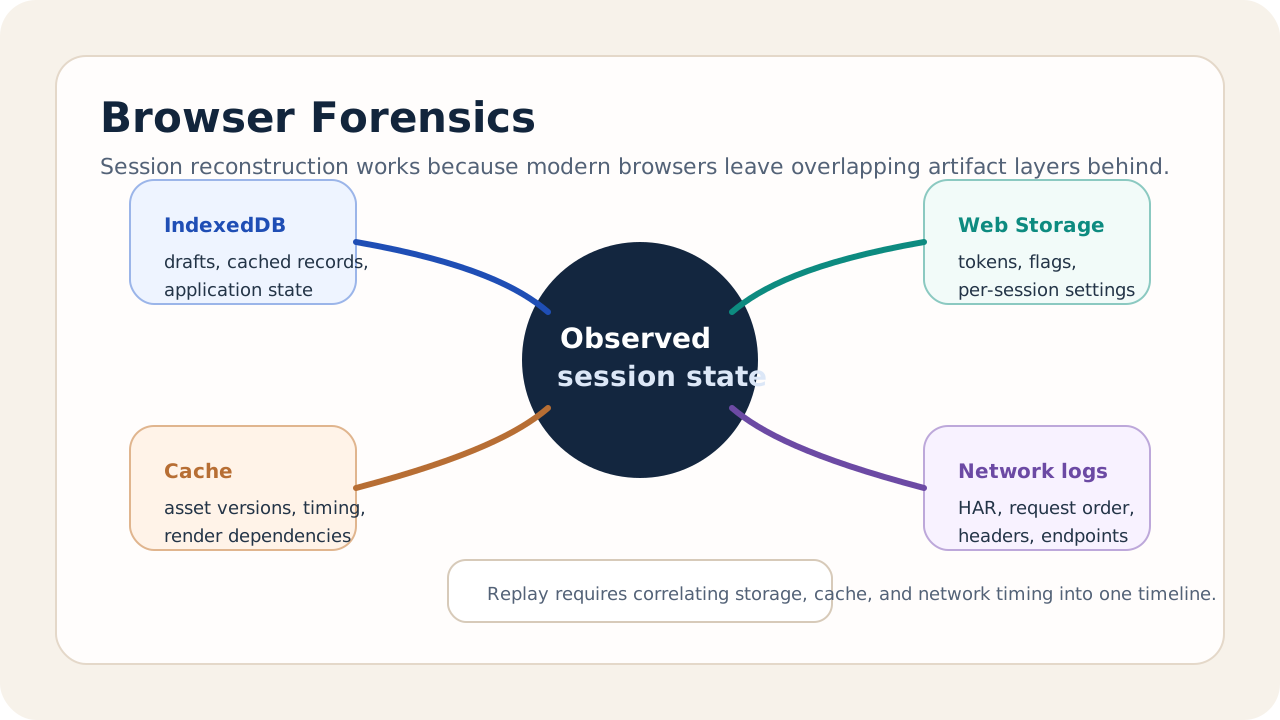
1. The Browser as a Forensic Log
A modern browser is a remarkably thorough historian. Every interaction leaves a trail of artifacts that can be used to reconstruct a user’s intent.
SQL Databases and Key-Value Stores
Most people think of “History” and “Cookies,” but the real forensic gold is in the Structured Storage:
- IndexedDB and WebSQL: Many modern SPAs store significant portions of their application state (messages, drafts, user settings) in these local databases. Even if the user logs out, remnants of the data often persist.
- LocalStorage/SessionStorage: These contain the specific “Environment State” of the session—JWT tokens, feature flags, and UI state indicators.
Corroboration note. The browser storage claims in this section map cleanly to the platform surface documented in the IndexedDB API terminology, the Web Storage interface, and Chrome's own IndexedDB inspection tooling.
Cache Analysis
The browser cache is more than just a performance booster; it is a timestamped record of every asset requested. By analyzing the modification dates and cache headers of specific CSS or JS files, a forensic analyst can determine exactly which version of a site the target was visiting at a specific moment in time.
2. Session Reconstruction: Building the DOM from Logs
If you have access to the network logs (HAR files) or proxy logs, you can perform Session Reconstruction.
By replaying the sequence of HTTP requests and responses into a controlled browser environment, we can “Re-render” the exact experience the target had.
- We can see the specific popups they interacted with.
- We can see the error messages they received.
- We can identify the hidden “Tracking Pixels” or “Beacon Services” that were active during the session.
This “Temporal Replay” is the closest we can get to a “Digital Time Machine.”
Representative reconstruction pass
One representative web-forensics pass looks like this:
- Pull IndexedDB and Web Storage to recover drafts, flags, and identifiers that never made it into server-side logs.
- Rebuild the request timeline from HAR or proxy output so the operator can see the exact sequence of asset and API calls.
- Cross-check the cache timestamps to infer which version of the frontend bundle was active at the moment of the incident.
- Re-render the session in a controlled environment so investigators can inspect the same UI states, prompts, and failure conditions the user actually saw.
This is the difference between “we think they clicked this” and “we can show how the session evolved.”
3. The Scars of the Inverted Web
Forensics isn’t just about the client; it’s about the Infrastructure.
When a target uses an onion service or a decentralized platform, they leave “Traffic Scars” on the network.
- Timing Analysis: By correlating the burst patterns of encrypted traffic with known server-side events, we can identify a user’s location or activity type.
- Protocol Artifacts: Small inconsistencies in how a server handles a “Malformed Request” can reveal the specific version of the underlying software (e.g., Nginx, Apache, or a custom C2 server).
4. Evidence Decay and the Importance of Timing
In web forensics, time is the enemy.
- Browser Autoclean: Modern browsers frequently purge cookies and cache.
- Server Ephemerality: Logs are rotated, and ephemeral VMs are destroyed.
Successful forensics requires a Tiered Preservation Strategy. When an incident is detected, the system must immediately trigger a “Snapshot Command” to all relevant nodes to preserve their current state before the standard cleanup routines can execute.
5. Summary: Reconstructing the Truth
Web forensics is about finding the Signal in the Silence. It is the technical discipline that allows us to speak for the data when the original source is gone.
By understanding the deep storage of the browser, the persistence of the network, and the mechanics of session reconstruction, we turn “Missing Data” into “Actionable Intelligence.” We move from a world where we “Missed the event” to a world where we “Rebuild the truth.”
This is the final technical layer of the Intelligence Core. It is the capability that ensures that even when the adversary thinks they have scrubbed their traces, the system still remembers.
Sources and corroboration
- IndexedDB key characteristics and terminology
- Web Storage API: Storage interface
- Chrome DevTools: View and change IndexedDB data
- NIST SP 800-86: Guide to Integrating Forensic Techniques into Incident Response
Next Up: Sovrint: Temporal Propagation of Coordinated Narratives